Put a wireless charging receiver coil into a metal-bodied device — against a battery, a shield can, a housing wall — and two things go wrong at once: the metal eats your efficiency, and the efficiency it eats turns into heat. The thin ferrite sheet between coil and metal is what stands between a design that charges and one that cooks. This guide answers the four questions engineers ask us most: what to look for, how to compare options, how to tell you picked wrong, and what to do when there's no space.
Why a Charging Coil Needs a Shielding Sheet in a Metal Housing
Qi wireless power transfers energy through alternating magnetic fields — at 87–205 kHz for classic Qi, and at a fixed 360 kHz for Qi2 MPP. When that alternating field reaches a conductive surface, it induces eddy currents in the metal. Those currents do three kinds of damage:
- Lost efficiency — energy meant for the battery is burned in the housing instead; coupling drops and charge times stretch
- Heat where you least want it — eddy currents heat the battery and housing; a warm battery ages faster and trips thermal throttling
- Detuned coil — the metal changes the coil's effective inductance, pushing the resonant tank off its design point
A ferrite shielding sheet gives the magnetic flux a low-reluctance path parallel to the metal surface. Field lines travel through the sheet instead of the metal: coupling is restored, the battery stays cool, and the coil keeps its designed inductance.
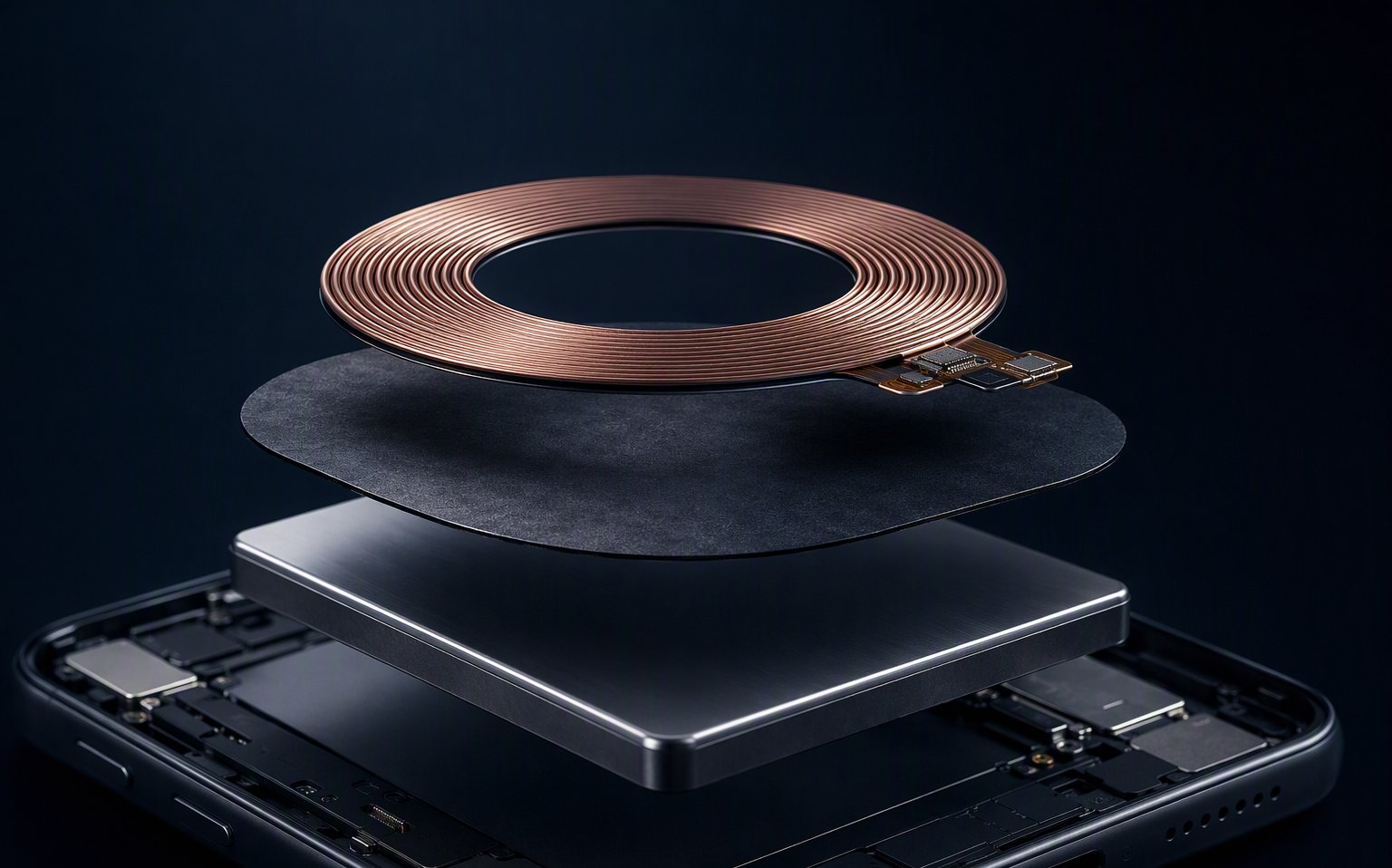
Ferrite Sheet or Absorber Sheet? Different Jobs, Different Frequencies
Both look like thin black sheets. They do opposite things:
- Ferrite shielding sheet — high real permeability (μ′), low magnetic loss at your operating frequency. It redirects flux. This is what a wireless charging coil needs.
- EMI absorber sheet — high loss by design, converting noise energy to heat, typically working from hundreds of MHz into GHz. It burns energy. Put it behind a charging coil and it will absorb the very field you're trying to transmit.
The one-line rule: if the goal is to keep a magnetic field working (NFC at 13.56 MHz, wireless power at 87–360 kHz), you want a low-loss ferrite. If the goal is to kill unwanted high-frequency noise, you want an absorber. See the full frequency map on our Electronics & EMI page.
What to Look for When Selecting a Sheet for a New Project
Five parameters, in the order that actually decides the choice:
- 1. Operating frequency first. Qi 1.x works across 87–205 kHz; Qi2 MPP fixes the operating point at 360 kHz. Permeability and loss both move with frequency — a datasheet that quotes μ′ at 1 kHz tells you almost nothing about 360 kHz. Always compare values at your frequency.
- 2. Real permeability μ′ at that frequency. Higher μ′ redirects more flux and raises the coil's inductance — usually good for coupling, but it shifts resonance, so your tank values must be re-checked with the sheet in place.
- 3. Magnetic loss (μ″ or core loss) at that frequency. This is the efficiency killer. A sheet can have beautiful μ′ and still burn 10% of your power as heat inside itself. Low loss at 87–360 kHz is non-negotiable.
- 4. Thickness vs. saturation. Thinner sheets save stack height but saturate earlier at high power. For 5 W receivers almost any thin sheet works; at 15 W and above, saturation margin becomes a real selection criterion.
- 5. Coverage and mounting. The sheet should extend 2–3 mm beyond the coil outline on all sides, sit flat with no air gaps, and never be creased across its plane. Adhesive backing and die-cut outlines are standard — send the outline, not just "a square".
How to Compare Different Options Before Choosing One
Datasheets narrow the field to two or three candidates; the bench decides. The comparison that actually predicts field performance, in order of information value:
| Measurement | How | What it tells you |
|---|---|---|
| System efficiency | Input power at the transmitter vs. received power, coil against the real metal stack, with each candidate sheet | The single number that pays for everything — picks up flux redirection and sheet self-heating in one figure |
| Temperature rise | Thermocouple or IR camera on the battery/housing surface after 15–30 min at full power | Whether eddy currents still reach the metal — the safety metric |
| Charging distance (z-gap) | Maximum coil-to-coil distance at which charging still initiates and holds | Coupling quality — a better sheet buys you mechanical tolerance |
| Coil inductance shift | LCR meter on the coil, with and without sheet and metal | How much your resonant tank needs re-tuning |
Typical values for selection reference — verify on your actual device and coil before freezing the design.
If two candidates tie on efficiency, pick the thinner one. Every 0.05 mm you don't need is stack height and cost you keep forever.
How Do You Know If You've Picked the Wrong Option?
The wrong sheet rarely fails loudly — it fails as a vague "charging is kind of slow and warm". The symptoms we see most often in failed designs:
- Efficiency noticeably below the free-air bench value — the sheet isn't redirecting enough flux, or is lossy at your frequency
- The phone back or battery warms up during charging — eddy currents are still reaching metal; coverage or permeability is insufficient
- Charging starts, then drops out intermittently — thermal protection or foreign-object detection is triggering on the heat the sheet was supposed to prevent
- FOD false alarms — distorted fields from eddy currents confuse foreign-object detection; often misdiagnosed as a firmware problem
- It passed the bare-board test but fails in the final housing — the classic: battery shields, metal midframes and conductive coatings all count as "metal"
Any of these → re-run the bench comparison above with the next candidate before touching firmware or coil geometry.
Compact, Space-Constrained Designs: Getting Thin Without Paying for It
Wearables, earbuds cases, slim phones: the question is always "how thin can the sheet be before I regret it". The honest answer has two parts:
- Thin is fine — if μ′ is high enough and loss is low. Modern flexible ferrite in the 0.05–0.15 mm range handles most 5–15 W receivers. You pay for thinness with money (higher-grade material), not necessarily with performance.
- Thin fails through saturation, not through shielding. At higher power, flux density in a thin sheet climbs until the material saturates and locally stops working — efficiency sags and a hot spot appears right where saturation starts. If your design is 15 W or above, ask for the saturation behavior, not just the μ′ number.
And the two corners nobody should cut: coverage (keep the 2–3 mm overhang even when space is tight — shrink the coil, not the sheet) and air gaps (a 0.1 mm air gap costs more performance than 0.1 mm of extra sheet buys).
Dual-function devices: many products carry both a wireless charging coil (kHz) and an NFC antenna (13.56 MHz) over the same battery. The optimal permeability differs by frequency, so one sheet is a compromise — tell us both functions and we'll propose the stack-up. NFC side covered in our NFC Ferrite Sheet Guide.